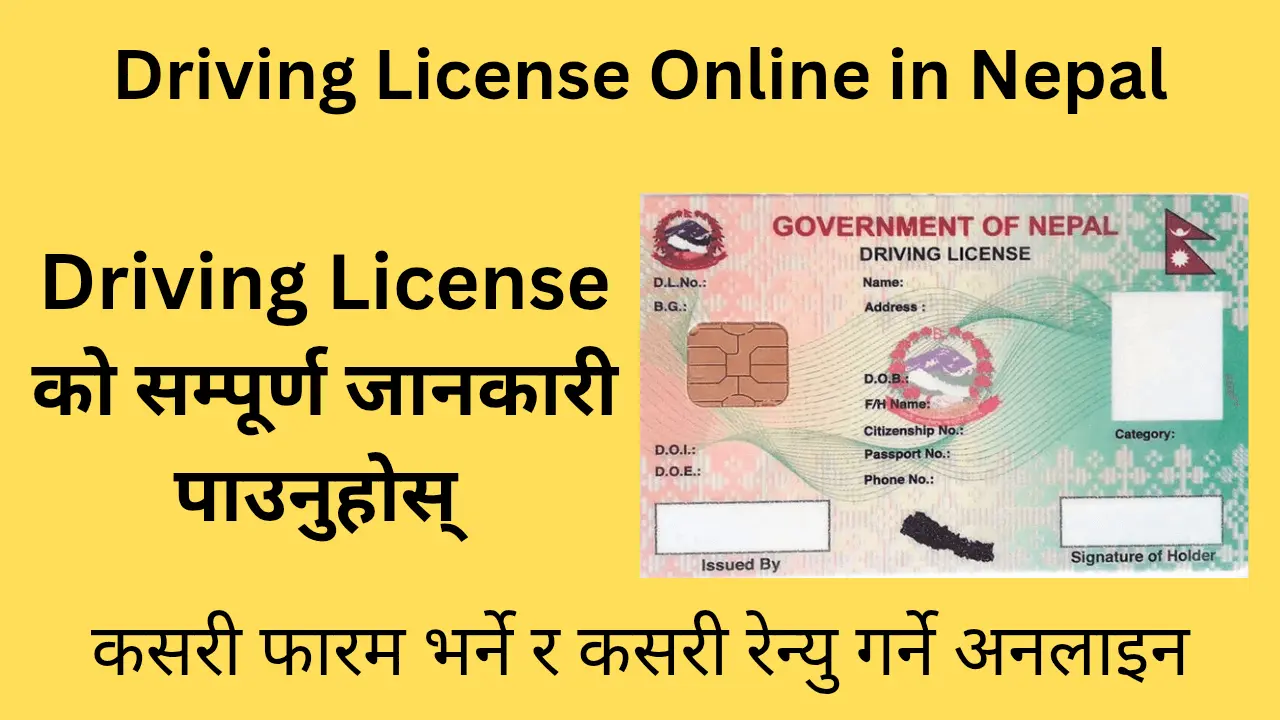
Driving License Online in Nepal: The Complete A-to-Z Guide (2025 Update)
Are you also tired of long queues at the transport office, unnecessary expenses paid to middlemen, and the constant frustration of “system down”? Or have you just reached the eligible age and are planning to apply for your first driving license?
Drawing from my decade-long close study of Nepal’s transport sector and digital systems, this article is more than just ordinary information. It is a distillation of practical solutions, the latest directives of the Department of Transport Management (DoTM), and the expert tips needed to successfully obtain your license without relying on anyone else.
Let us understand the process of obtaining a driving license in Nepal from A to Z.
1. Introduction: The Reality of the Smart License System
When Nepal switched from old handwritten licenses to the modern Smart Driving License, the whole procedure became semi-digital. That means:
- The form is filled online,
- But you must visit the transport office for biometrics, medical tests, and exams.
Expert Note: Due to lack of accurate information, many service seekers are forced to spend a lot of money on work that could be done for little money. The purpose of this article is to make you self-reliant.
2. Required Preparation: Are You Legally Eligible?
Before applying, you must confirm your legal eligibility. According to the Transport Management Act, 2049:
Age Limits
| Vehicle Type | Category | Minimum Age |
|---|---|---|
| Two-wheelers (Motorcycle/Scooter) | A / K | Must have completed 16 years of age. |
| Four-wheelers (Car/Jeep/Van) | B | Must have completed 18 years of age. |
| Heavy Vehicles (Bus/Truck) | C, D, E, etc. | Must have completed 21 years of age. |
Health Requirements
- Eyesight must be sufficiently good.
- Individuals with color blindness (inability to distinguish certain colors, typically red and green) are considered ineligible for a driving license.
Driving Licence Fees & Documents Checklist (First-Time Applicants)
3.Mandatory Documents: Keep Them Ready
Before filling out the online form, have the following documents scanned or clearly photographed on your mobile. It is best if the file size is less than 200 KB.
- Nepali Citizenship Certificate:
- A clear photo of the front and back of the original citizenship certificate.
- Tip: If the citizenship is very old or the text is unclear, obtain a “copy of citizenship” or “recommendation” from the ward office before applying.
- Passport-size photo:
- Recently taken, with a plain background. (No glasses or cap).
- Blood Group Card:
- Card issued by any recognized laboratory or hospital.
- Note: If you don’t have one, you can check your blood group on your office visit day at a nearby clinic for about ₹100.
- Signature:
- A photo of your signature made with black ink on white paper.
4. Step-by-Step Online Application Process
The new and official portal is applydlnew.dotm.gov.np. Always use this link as data from the old server has been migrated here.
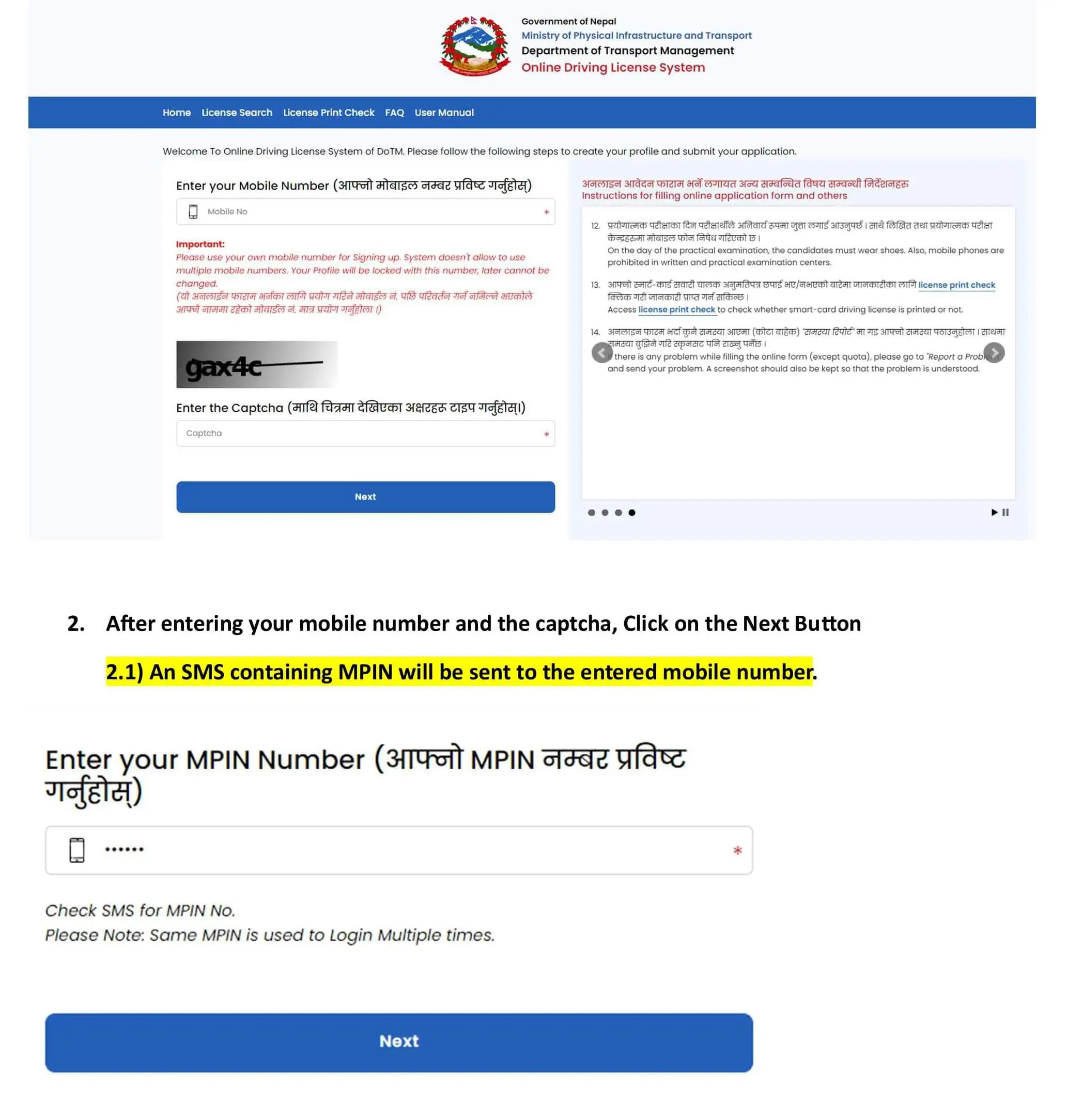
Step 1: Account Registration (Sign Up)
- Type applydlnew.dotm.gov.np in your browser.
- Click the “Sign Up” button.
- Enter your full name, date of birth (as per citizenship), and mobile number.
- Important: Use your own mobile number, as the OTP and later the license printing notification will come to this number.
- Enter the OTP (One Time Password) received and verify it.
- Create an account by setting a strong password.
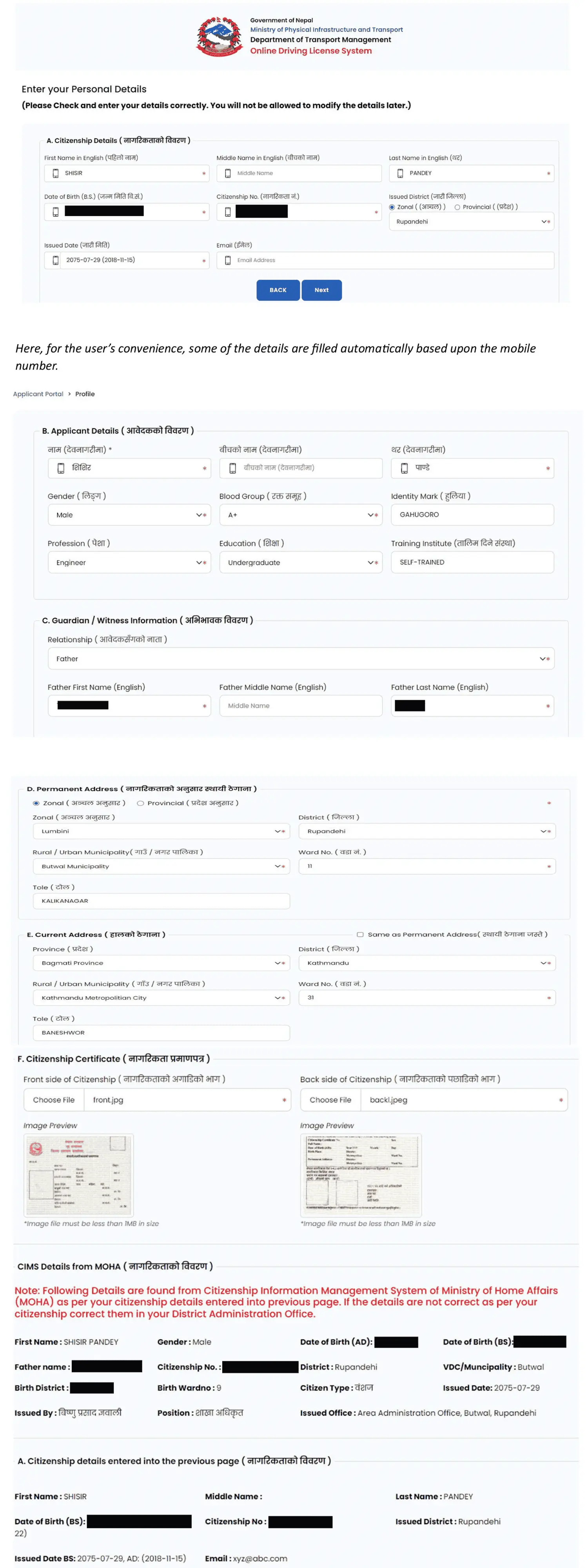
Step 2: Filling Personal and Address Details
After logging in, you will fill in three sections:
- Personal Details: Name, date of birth, blood group, and guardian’s details.
- Address: Permanent address (as per citizenship) and Current address.
- Expert Note: While not mandatory, it is better to provide a current address that is in or near the district of the transport office where you wish to apply.
- Citizenship Details: Citizenship number, issuing district, date of issue, and type. You must upload the photo of the citizenship here.
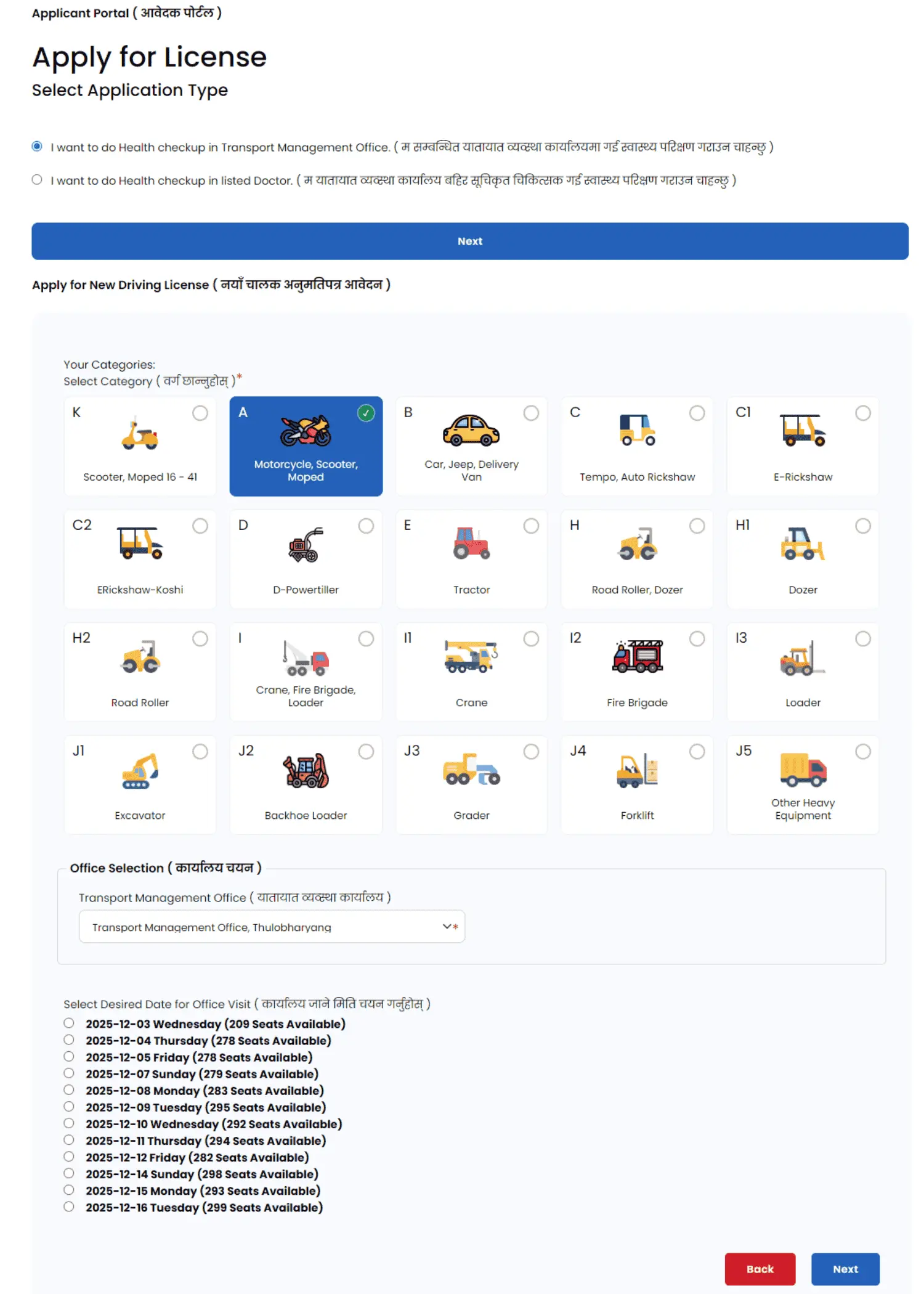
Step 3: Selecting License Category
- Click “Apply for New License.”
- Choose the vehicle category: A (Motorcycle), K (Scooter), or B (Car/Jeep/Van).
- Note: You can apply for only one category at a time. You can add another category only after you have obtained the first license.
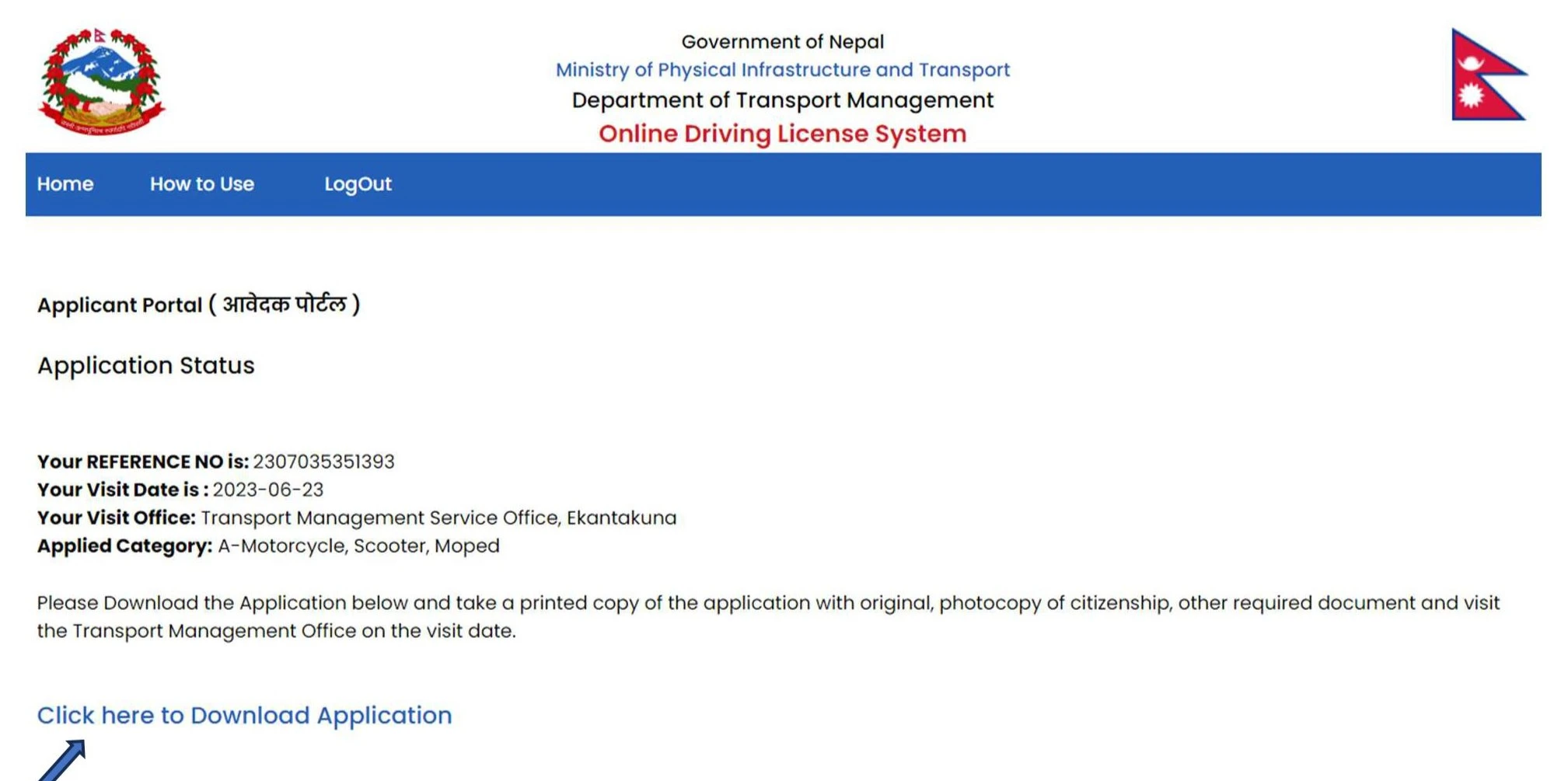
Step 4: Office and Date Selection (The Challenging Part)
This is the most critical step.
- Select the Province and Transportation office that is convenient for you (choose the transportation office closest to you).
- You will see dates with available “quota” (slots) marked in green.
- Choose a suitable date and click “Apply.”
- Download the application PDF and make a photocopy.
Scan the PDF you downloaded with a printer and attach your photo to that form.
5.Quota (Slot) Issue and Its “Hack” (Insider Tips)
Many users complain that slots are never available (Quota Full). Here are some insider tips:
| Strategy | Description |
|---|---|
| The 16-Day Rule | The DoTM system generally opens new quota automatically for dates that are 16 days ahead of the current date. |
| The Golden Hour | Quota is usually updated between 7:00–8:00 AM or after 5:00 PM. Trying early in the morning or after office hours increases your chances. |
| Fridays and Saturdays | There is often less system traffic or new slots are released on these days, making applications easier. |
| The Refresh Trick | If a date shows as red (Full), do not give up immediately. Continuously refreshing the page for 5–10 minutes can sometimes secure a slot if another user’s session times out. |
6. Biometric and Office Visit: What to Expect
You must visit the transport office on the appointment date you received online. This is the “biometric visit.”
What to Bring
- Printed copy of the online form (Applicant Copy).
- Original citizenship and one photocopy.
- Blood group card (if available).
- A ₹10 ticket (stamp).
- ₹500 for the written exam fee.
Process Flow
- Document Verification: Staff verify your online details against the original citizenship.
- Biometric Capture: All 10 fingerprints are taken, your digital signature is recorded, and a photo is taken with a webcam.
- Tip: Wear appropriate clothes, as this photo will appear on your license.
- Medical Checkup: Eyesight and color blindness tests are performed. If you cannot distinguish red and green colors, you will be ineligible.
- Revenue Payment for Written Exam: After passing biometric and medical checks, pay ₹500 for the written exam. Keep the receipt safely.
7. Written Exam (Likhit): The 100% Pass Formula
The written exam takes place the day after the biometric visit or on the specified date.
| Details | Criteria |
|---|---|
| Full Marks | 100 |
| Pass Marks | 60 (Currently applied; previously 50) |
| Number of Questions | 20 (Each carries 5 marks) |
| Time | 30 minutes |
The Expert Formula to Pass
- The Department of Transport Management has published a collection of 500 questions (Question Bank).
- The 30 questions asked in the exam are taken only from these 500 questions.
What to study? Do not buy bulky market books. Memorize only those 500 questions from the department’s website or from mobile apps such as “Nepal Driving License Exam.”
8. Car and Bike Trial (Practical): The 70-Point System
After passing the written exam, you proceed to the practical trial. The 70-point system, introduced in 2021, has made it easier: you pass if you score 70 out of 100.
a) Mark Distribution for Motorcycle/Scooter (Category A/K)
| Step (Task) | Total Marks | Deduction | Result |
|---|---|---|---|
| Figure 8 | 20 | Foot down: -5 (Allowed once) Touching the line: -5 (Allowed once) | Fail if > 20 deducted |
| Narrow Plank | 10 | Foot down or going off the plank: -10 | FAIL |
| U-Turn | 10 | Not turning on the indicator or touching the line: -10 | FAIL |
| Traffic Light | 15 | Not following the light signal: -15 | FAIL |
| Ramp (Uphill/Downhill) | 20 | Crossing the designated line or rolling back after stopping: -20 | FAIL |
| Speed Breakers | 15 | Foot down once: -5 Engine stopping once: -5 | Pass possible |
| Behavioural Aspect | 10 | Small errors (e.g., helmet lock, mirror check): -3/4/3 | Pass requires 70 score |
On a motorcycle, you can pass by stepping on a figure 8 once and touching the line once (5+5 = 10 points deduction). However, you cannot make a mistake on a ramp or traffic light.
b) Key Mark Distribution for Car/Jeep (Category B)
For cars, you also pass if you score 70 marks.
- Figure 8: 20 marks (You may touch the line up to twice).
- Traffic light: 15 marks (Mandatory).
- Garage Parking (Reversing): 20 marks (You may move forward once; -10 marks are deducted).
- Ramp (Uphill): 20 marks (This is the most critical component).
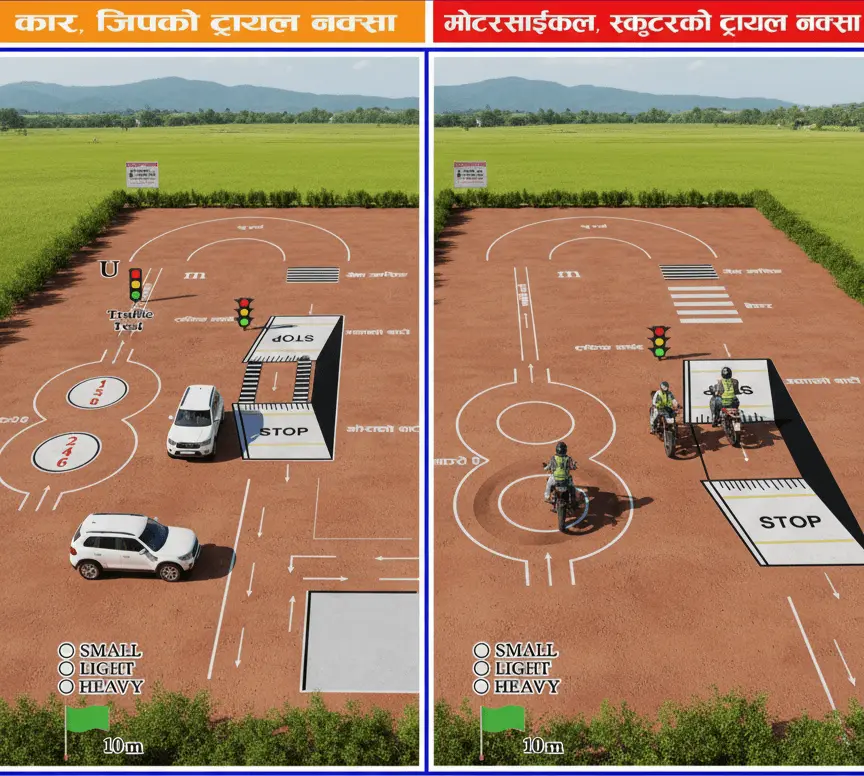
c) Bike and Car Trial figure 8 size
You can learn how to make a figure 8 by looking at this picture or making your own.
9. Payment and Revenue: How to Pay?
Most offices now have an online payment system in place.
When to Pay?
- For the written exam: ₹500.
- After passing the trial:
- For bike/scooter: ₹1,500, or
- For car: ₹2,000.
How to Pay?
- Through the Portal: Log in to applydlnew.dotm.gov.np and go to “Make Payment.” Choose ConnectIPS, eSewa, or Khalti and pay directly.
- Benefit: No waiting in line, and you can print the receipt immediately.
- Bank Voucher: If online issues persist, you can pay in cash at the bank counter located inside the office.
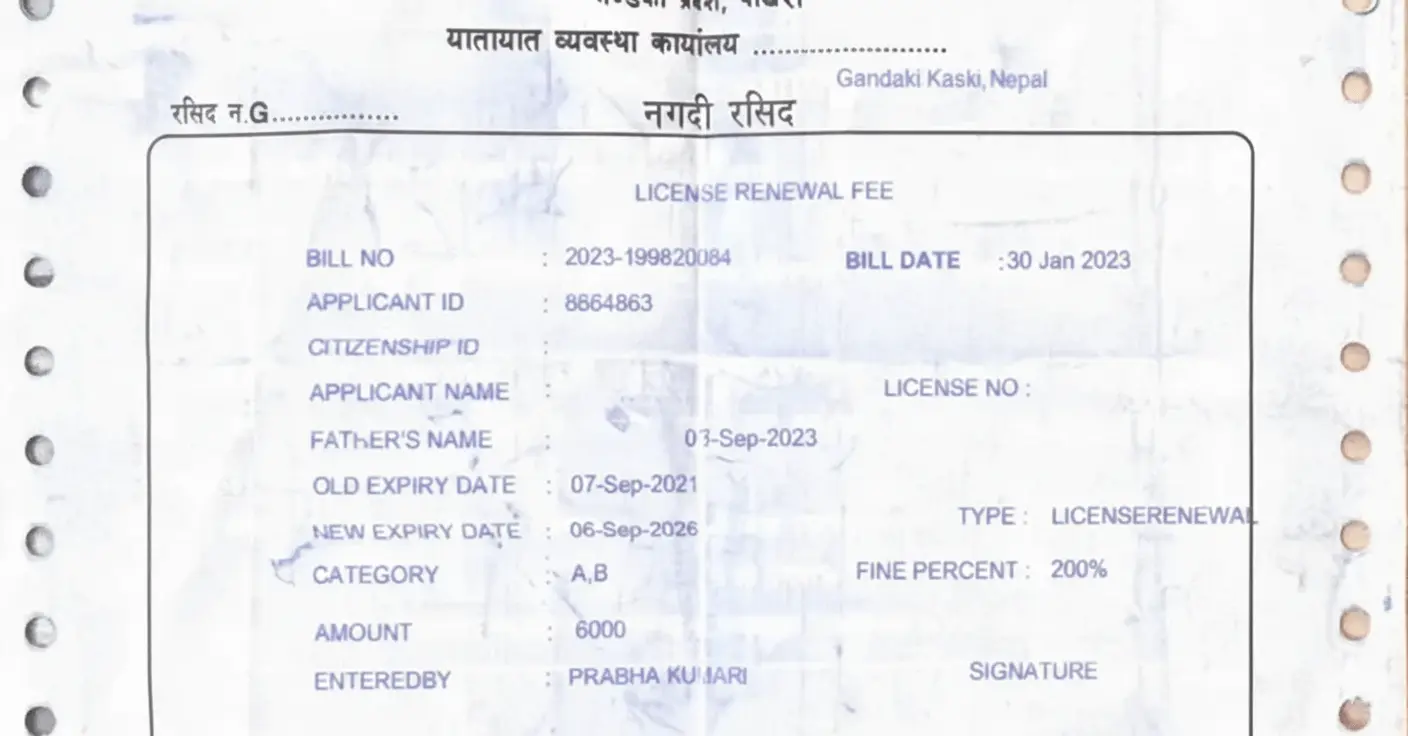
After Passing the Trial
Within about 10 days of passing the trial, you must pay the final revenue (₹1,500/₹2,000). This receipt itself serves as your “temporary license.” You must show this receipt to traffic police until your smart card is printed (which can take up to a year).
10. Major Problems and Solutions (Troubleshooting Common Errors)
Here are the major technical problems observed and their expert solutions:
1. “Citizenship Details Not Found in MOHA”
This is the biggest headache while filling the online form.
- Reason: Your citizenship details have not been synced into the central database of the Ministry of Home Affairs (MOHA). This often happens with old or newly issued certificates.
- Solutions (Expert Solutions):
- Method 1: Visit the District Administration Office (CDO Office) where your citizenship was issued and request that your data be updated/synced in the “MOHA” system.
- Method 2 (Office Visit): Even with an error, take a screenshot and your original citizenship to the “IT section” of the transport office. They can sometimes manually bypass or verify the system.
- Method 3 (Verification): Download the Nagarik App. If your citizenship details appear there, your data is correct. If not, Method 1 is the only option.
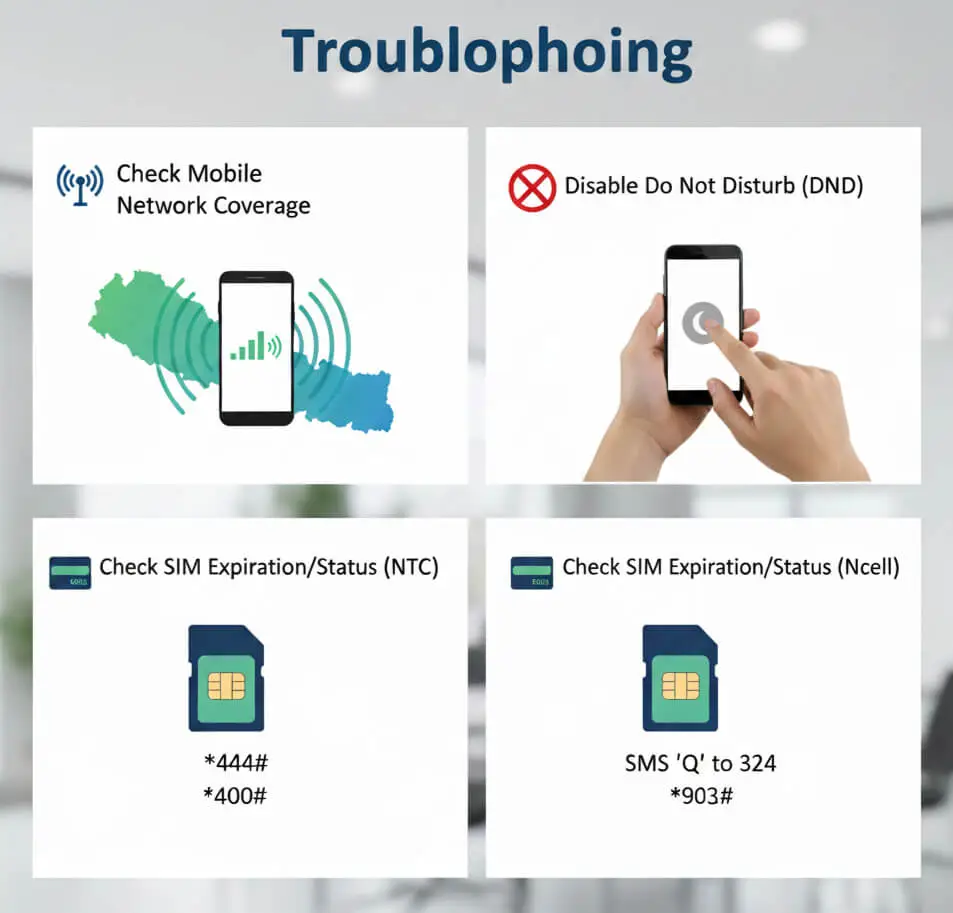
2. OTP Code Not Received
- Solution:
- Check mobile network coverage.
- Disable Do Not Disturb (DND) if activated.
- If you do not receive an OTP on your Nepal Telecom (NTC) number or Ncell number, please check the expiration date of your SIM.
3. If Name or Details Are Incorrect (Correction)
- Solution: You can only correct details online if you have clicked “Save” but not “Submit.”
- What to do? When you go for the biometric, inform the staff at the counter, “My details are incorrect, please correct them.” They can edit the system before your biometric data is recorded.
11. License Renewal
- If you renew your license within 3 months after expiry, no penalty is charged.
- After 3 months, the penalty increases annually.
- If more than 5 years pass after expiry, the license is cancelled.
- For renewal, select the Renewal option online, complete a medical checkup, and pay the required revenue. You may have to visit the office once to update your biometric data.
You can renew your old driving license from your home.
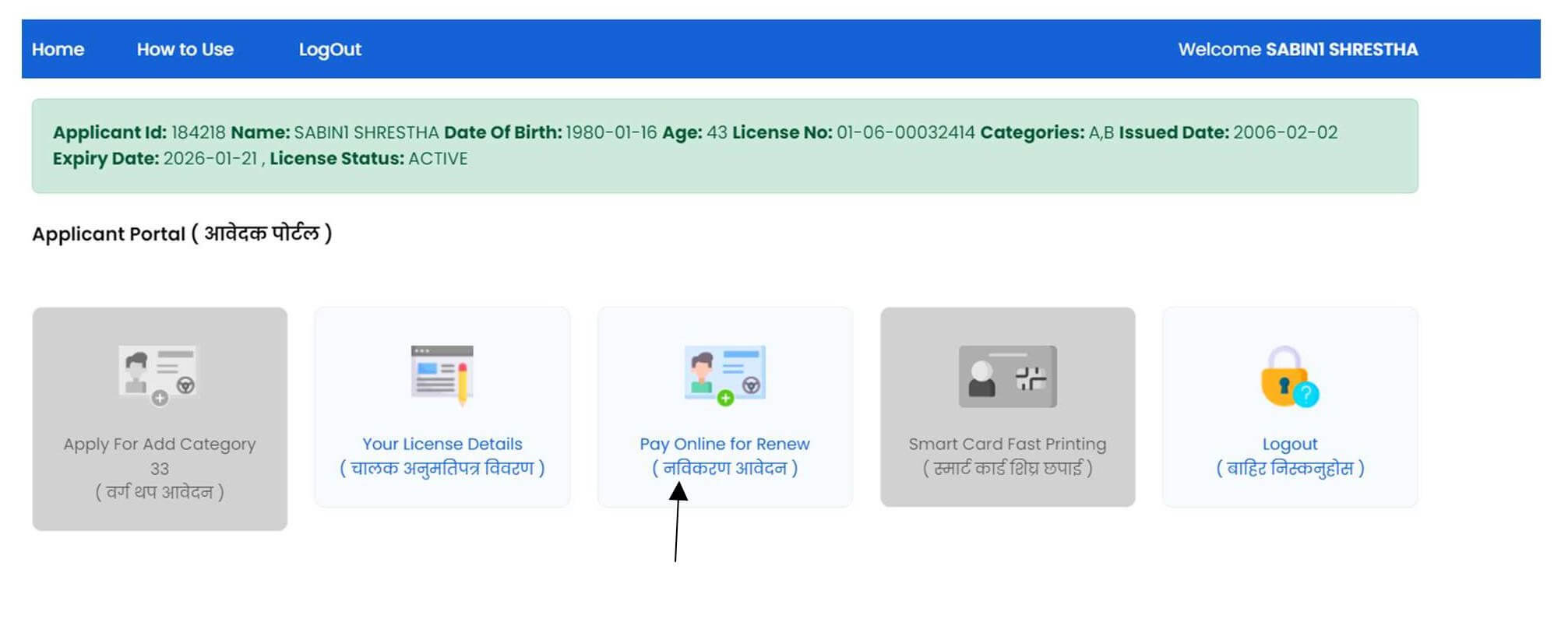
License Renewal Process: After logging in, go to “Renew Your License,” choose the office and doctor for your medical checkup, visit the selected clinic or office for the health examination, and once your medical report is approved you can proceed to “Pay Online for Renew” using eSewa, Khalti, or connectIPS, but if the approval remains pending for more than three days, you should visit the transport office directly.
12. Conclusion and My Final Suggestions (Pro Tips)
While the process has become more systematic, technical errors and quota issues persist.
My Final Tips:
- Stay away from middlemen: Paying ₹500–₹1,000 to fill out an online form is unnecessary. Follow this guide and do it yourself in 10 minutes.
- Be patient: Server downtime is common. Don’t panic. Just try again later.
- Practise at the trial centre: Before going for the trial, practise at the official trial centre of the related office (or a driving centre with the same layout). The size of the “8” and the gap for the U-turn can vary.
- Do not leave your original documents: Keep your original documents safely with you.
- Exam and trail results: The results will be available on the transport website and can also be viewed on the Facebook page.
Driving on Nepal’s roads is a responsibility. A license is not just a card; it is proof of your commitment to your own safety and that of others. Complete the process and drive safely.